

DALI-2 IoT Gateway
€567,16 Incl. tax €605,00 Incl. tax. Not in stock in our warehouse, but available to order. Manual

Specifications
Information
Connect DALI and DALI-2 systems to a local network
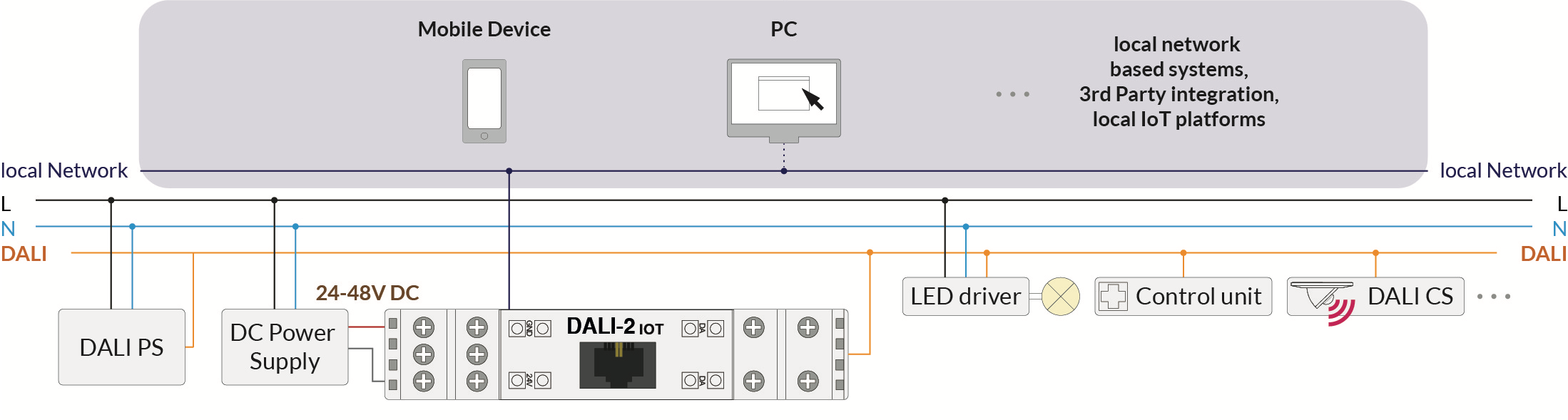
This gateway provides a central interface between a DALI or DALI-2 installation and a local Ethernet network. Connected DALI devices can therefore be addressed, controlled, monitored and queried via the LAN. The gateway is suitable for integration into building management systems, visualisation platforms, custom software and other network-based applications.
External systems can send commands and receive information from the DALI installation using the available RESTful API and WebSocket connection with JSON syntax. Communication can be encrypted or, if required, unencrypted. This makes it possible to implement control, status monitoring, energy-related applications, remote support and automated processes.
Multiple separate DALI lines can be connected by linking several gateways through the local network. DALI commands and information can then be exchanged between different DALI circuits, allowing larger installations to be centrally managed.
Main features
- Central control device and interface between DALI-2 and LAN.
- Suitable for DALI and DALI-2 installations.
- Supports addressing, status queries, monitoring and control of DALI devices.
- Supports RESTful API endpoints.
- Supports WebSocket communication using JSON syntax.
- Encrypted communication, with optional unencrypted communication.
- Integration with local network-based third-party systems.
- Several separate DALI lines can be interconnected through the LAN.
- Suitable for use with smartphones, tablets and computers.
- Can be used as a network interface for Lunatone DALI Cockpit.
- Integrated timer, circadian control and sequencer functions.
- Web interface for firmware updates and uploading macros.
- Automatic network configuration via DHCP.
- DIN rail mounting.
RESTful API and WebSocket
The gateway provides a documented API for custom integrations. DALI devices can be controlled, queried and monitored through RESTful API calls. The WebSocket connection can be used for continuous communication and for receiving and processing events from the DALI installation.
Communication uses JSON syntax, making it relatively easy to connect the gateway to building management systems, dashboards, databases, visualisation platforms and other software environments. The basic services and API documentation can be accessed locally through the IP address of the device.
Control and monitoring
The gateway allows DALI devices to be controlled and monitored from smartphones, computers and other network devices. Depending on the software or integration used, functions such as light levels, colour temperature, light colour and other DALI functions can be controlled.
The status of connected devices can also be queried. Received information can be used for dashboards, fault notifications, additional automation or other follow-up actions. DALI-2 sensor events can be received and processed through the WebSocket connection, provided that these events have been activated in the relevant sensor or are queried periodically.
Integrated functions
- Timer: for time-controlled DALI actions.
- Circadian control: for time-dependent lighting and colour-temperature control.
- Sequencer: for recalling sequences of DALI commands.
- Macros: can be uploaded to the device through the web interface.
- Monitoring: querying and processing device statuses and DALI-2 events.
Connecting multiple DALI lines
By installing several gateways on the same network, separate DALI lines can be connected. DALI commands and information can be forwarded selectively between different gateways. This enables cross-line control and central integration without requiring all devices to be connected to the same physical DALI line.
DALI Cockpit interface
The gateway can be used as a network interface for the Windows application Lunatone DALI Cockpit, version 1.38 or later. The computer running DALI Cockpit and the gateway must be connected to the same local network.
The gateway can be selected as a network interface within DALI Cockpit. The connected DALI bus can then be used for addressing, configuring, monitoring and controlling DALI and DALI-2 devices.
Network connection
By default, the gateway automatically obtains an IP address using DHCP. If a DHCP server cannot be reached, for example when the device is connected directly to a computer, it switches after approximately one minute to the static IP address 169.254.0.1 with subnet mask 255.255.0.0.
The IP address can be located on the local network using the discovery protocol. The gateway listens for UDP packets on port 5555. Network settings can be changed through the locally accessible API documentation.
Web interface and firmware updates
The integrated web interface can be opened by entering the IP address of the gateway into a web browser. The computer, smartphone or tablet and the gateway must be located within the same network and address range.
Macros can be uploaded and firmware updates can be installed through the web interface. A firmware update can take up to approximately fifteen minutes. The device restarts automatically after the update has been completed.
The device should only be updated to a newer firmware version. Downgrading can result in data loss. The manufacturer recommends not using Microsoft Edge for firmware updates, as problems may occur with this browser.
Cloud access
The DALI interface can be made accessible through an optional cloud solution for tunnelling DALI commands. Cloud support must be requested separately from Lunatone. This functionality is not required for local operation of the gateway.
Installation
The gateway is mounted on a DIN rail and connected directly to the DALI bus. The device requires an external 24 to 48 V DC power supply. At a supply voltage of 24 V, the typical current consumption is approximately 90 mA.
The DALI line must be powered separately by a suitable DALI bus power supply. The DALI connection is polarity-independent and electrically isolated. The DALI input is also protected against mains voltage.
The wiring must be installed permanently in a dry and clean environment. Installation may only be carried out while the system is de-energised and by qualified professionals. Applicable national regulations for electrical installations must be observed.
Standard low-voltage installation material can be used for the DALI wiring. Special DALI cables are not required. However, the DALI signal is not classified as SELV, so the installation regulations for low voltage apply.
The voltage drop on the DALI line must not exceed 2 V at the maximum cable length of 300 metres and the maximum bus load of 250 mA.
Technical specifications
| Function | Central control device and interface between DALI-2 and LAN |
| Suitable for | DALI and DALI-2 |
| Supply voltage | 24-48 V DC |
| Typical current consumption | 90 mA at 24 V DC |
| Ethernet | 1 x Ethernet 10/100Base-T |
| Ethernet connection | RJ45 |
| Ethernet electrical isolation | Yes, 1500 V AC isolation voltage |
| DALI connection | 1 x DALI, electrically isolated |
| Communication | RESTful API, WebSocket and JSON |
| Network configuration | DHCP with automatic static fallback address |
| Fallback IP address | 169.254.0.1 |
| Fallback subnet mask | 255.255.0.0 |
| Operating temperature | -20°C to +60°C |
| Storage and transport temperature | -20°C to +75°C |
| Protection class | IP20 |
| Maximum wire cross-section | 2.5 mm² |
| Mounting | DIN rail, approximately 1.5 distribution units |
| Dimensions | 98 x 23 x 56 mm |
| USB port | No function |
Important information
- A separate and suitable DALI bus power supply is required for the DALI line.
- The device does not contain a battery for retaining the time during a power failure.
- When automatic date and time settings are enabled, the time can be corrected via the Internet.
- The USB port currently has no function.
- The gateway is a DALI multi-master device with collision detection.
- When used as a DALI interface, the device itself does not receive a DALI or DALI-2 address.
- The ping sent on the DALI line by default can be disabled through the web interface.
Version supplied by us
We exclusively supply the standard version 89453886. This version functions as a DALI-to-LAN interface and does not contain an integrated Node-RED server.
For applications using Node-RED, we recommend combining this standard gateway with a self-managed Node-RED server. This allows you to retain full control over the installation, updates and management of additional nodes and integrations.